Demystifying AI dubbing - Part 4: Lipsync with LatentSync
In the third part of this series, we discussed how to transform text into speech. We dove into F5-TTS, a state of the art model based on conditional flow matching.
In this part, we’ll discuss the final part of the puzzle, lip syncing. This part of the pipeline is responsible for syncing the speaker’s face and lips with the newly generated audio.
Lipsync intro
Lip syncing comprises a complex set of steps including multiple AI models and different algorithmic operations in order to produce a naturally looking video perfectly synced with the given speaker audio.
It would be best to explain the pipeline in detail using a concrete example. We’ll use a recent pipeline (LatentSync: Taming Audio-Conditioned Latent Diffusion Models for Lip Sync with SyncNet Supervision) developed by ByteDance (Tiktok’s parent company) as a reference to explain the entire lip syncing process.
ByteDance researchers were kind enough to open source their great work, both the code and the model weights are available at https://github.com/bytedance/LatentSync, making it relatively easy to use this model in practice.
A deep-dive into LatentSync
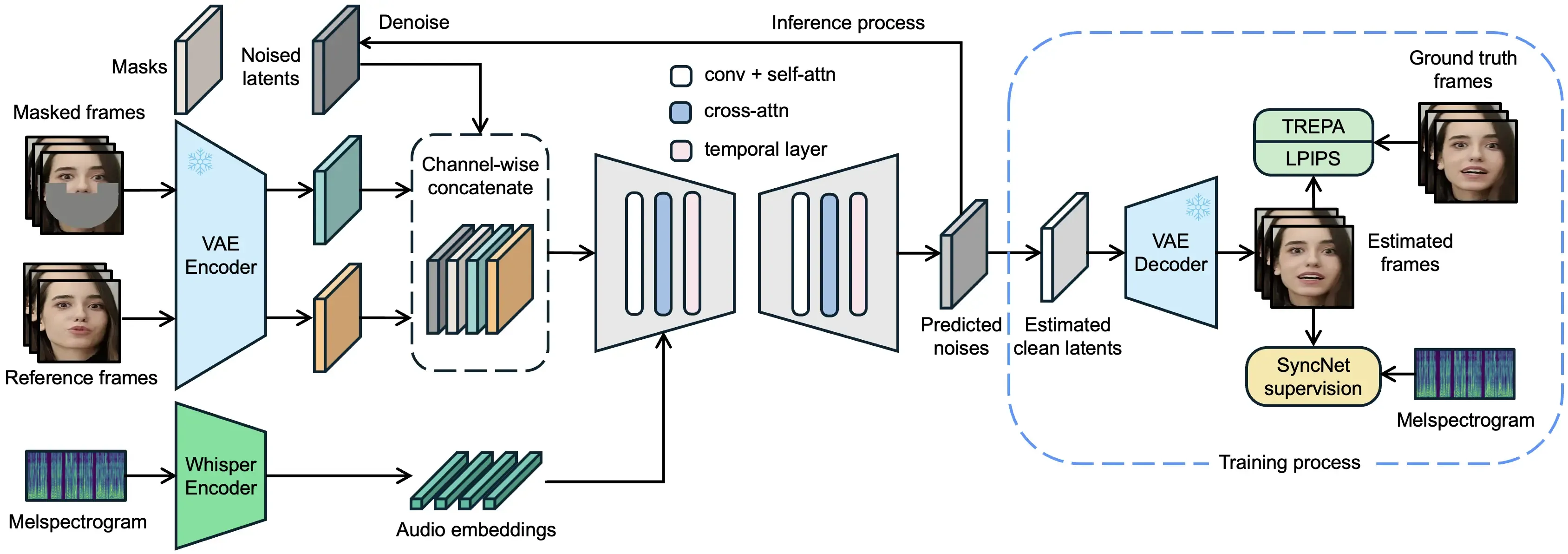
In general terms, the Latentsync pipeline makes use of the following main components:
- Encode the speaker’s voice with Whisper
- Reduce the dimensionality of the video frames using a VAE
- Normalize the speaker’s faces using XXX
- Mask the lower part of the face of the speaker (using keypoints from XXXpipeline)
- Use a diffusion model to generate the masked part of the speaker’s face, conditioned on the encoded voice
- Use the VAE to decode the latents back to a frame
This architeture is fairly standard, and it’s somewhat similar to that we have seen in F5-TTS for Speech-To-Text generation.
There is a lot of similarity between these two domains and the main gist when we try to generate audio or images based on some condition the process is often based on a combination of condition embedding (here it’s the audio with Whisper), VAE encoding, masking, diffusion generation and VAE decoding - in that order.
So how does it work in practice? Let’s have a look.
Audio Encoding
We’ll start with the audio encoding of the speaker’s voice.
Latent sync uses Whisper as the audio encoder. Whisper is a transformer based model that uses the standard transformer architecture from Attention is all you need, adding a few basic changes in order to support speech-to-text. Let’s see how it works.
Latentsync starts by encoding the entire speaker’s audio file:
def _audio2feat(self, audio_path: str):
    # get the sample rate of the audio
    result = self.model.transcribe(audio_path)
    embed_list = []
    for emb in result["segments"]:
        encoder_embeddings = emb["encoder_embeddings"]
        ...
        embed_list.append(encoder_embeddings[:emb_end_idx])
    concatenated_array = torch.from_numpy(np.concatenate(embed_list, axis=0))
    return concatenated_array
The function responsible for encoding the audio file is model.transcribe. The function loops over each frame, proceeding as follows:
- Convert the input audio into an array of mel spectrograms (#1)
- Encode the mel spectrograms into a feature embeddings for each segment (#2)
def transcribe(
        model: "Whisper",
        audio: Union[str, np.ndarray, torch.Tensor],
        ...
):
    ...
    # 1. Convert audio to a mel spectrogram
    mel = log_mel_spectrogram(audio)
    ...
    with tqdm.tqdm(total=num_frames, unit='frames', disable=verbose is not False) as pbar:
        ...
        segment = pad_or_trim(mel[:,seek:seek+sample_skip], N_FRAMES).to(model.device).to(dtype)
        ...
        # 2. Encode the segment using whisper, produce segment embeddings
        audio_features, embeddings  = model.encoder(segment, include_embeddings = True)

        add_segment(
            start=seek,
            end=end_seek,
            encoder_embeddings=embeddings,
        )

    return dict(segments=all_segments)
The (Whisper) audio encoder is implemented as two layers of one dimensional convolutions with gelu activation to create the initial embeddings. Followed by adding sinusoidal positional embeddings, pushing the resulting features through residual attention blocks and finally layer normalizing the output.
class AudioEncoder(nn.Module):
    def __init__(self, n_mels: int, n_ctx: int, n_state: int, n_head: int, n_layer: int):
        super().__init__()
        self.conv1 = Conv1d(n_mels, n_state, kernel_size=3, padding=1)
        self.conv2 = Conv1d(n_state, n_state, kernel_size=3, stride=2, padding=1)
        self.register_buffer("positional_embedding", sinusoids(n_ctx, n_state))

        self.blocks: Iterable[ResidualAttentionBlock] = nn.ModuleList(
            [ResidualAttentionBlock(n_state, n_head) for _ in range(n_layer)]
        )
        self.ln_post = LayerNorm(n_state)

    def forward(self, x: Tensor, include_embeddings: bool = False):
        x = F.gelu(self.conv1(x))
        x = F.gelu(self.conv2(x))
        x = x.permute(0, 2, 1)

        assert x.shape[1:] == self.positional_embedding.shape, "incorrect audio shape"
        x = (x + self.positional_embedding).to(x.dtype)

        if include_embeddings:
            embeddings = [x.cpu().detach().numpy()]

        for block in self.blocks:
            x = block(x)
            if include_embeddings:
                embeddings.append(x.cpu().detach().numpy())

        x = self.ln_post(x)

        if include_embeddings:
            embeddings = np.stack(embeddings, axis=1)
            return x, embeddings
        else:
            return x
The resulting output is the encoded features for each mel spectrogram, producing the final features for the entire video. These will later be used to condition the lip syncing model.
Affine Transform
The next phase involves normalizing all of the video frames using affine transform. This does the following:
def loop_video(self, whisper_chunks: list, video_frames: np.ndarray):
    # If the audio is longer than the video, we need to loop the video
    if len(whisper_chunks) > len(video_frames):
        faces, boxes, affine_matrices = self.affine_transform_video(video_frames)
        num_loops = math.ceil(len(whisper_chunks) / len(video_frames))
        loop_video_frames = []
        loop_faces = []
        loop_boxes = []
        loop_affine_matrices = []
        for i in range(num_loops):
            if i % 2 == 0:
                loop_video_frames.append(video_frames)
                loop_faces.append(faces)
                loop_boxes += boxes
                loop_affine_matrices += affine_matrices
            else:
                loop_video_frames.append(video_frames[::-1])
                loop_faces.append(faces.flip(0))
                loop_boxes += boxes[::-1]
                loop_affine_matrices += affine_matrices[::-1]

        video_frames = np.concatenate(loop_video_frames, axis=0)[: len(whisper_chunks)]
        faces = torch.cat(loop_faces, dim=0)[: len(whisper_chunks)]
        boxes = loop_boxes[: len(whisper_chunks)]
        affine_matrices = loop_affine_matrices[: len(whisper_chunks)]
    else:
        video_frames = video_frames[: len(whisper_chunks)]
        faces, boxes, affine_matrices = self.affine_transform_video(video_frames)

    return video_frames, faces, boxes, affine_matrices
def affine_transform_video(self, video_frames: np.ndarray):
faces = []
boxes = []
affine_matrices = []
print(f"Affine transforming {len(video_frames)} faces...")
for frame in tqdm.tqdm(video_frames):
face, box, affine_matrix = self.image_processor.affine_transform(frame)
faces.append(face)
boxes.append(box)
affine_matrices.append(affine_matrix)
faces = torch.stack(faces)
return faces, boxes, affine_matricesdef affine_transform(self, image: torch.Tensor) -> np.ndarray:
if self.face_detector is None:
raise NotImplementedError("Using the CPU for face detection is not supported")
bbox, landmark_2d_106 = self.face_detector(image)
if bbox is None:
raise RuntimeError("Face not detected")
pt_left_eye = np.mean(landmark_2d_106[[43, 48, 49, 51, 50]], axis=0) # left eyebrow center
pt_right_eye = np.mean(landmark_2d_106[101:106], axis=0) # right eyebrow center
pt_nose = np.mean(landmark_2d_106[[74, 77, 83, 86]], axis=0) # nose center
landmarks3 = np.round([pt_left_eye, pt_right_eye, pt_nose])
face, affine_matrix = self.restorer.align_warp_face(image.copy(), landmarks3=landmarks3, smooth=True)
box = [0, 0, face.shape[1], face.shape[0]] # x1, y1, x2, y2
face = cv2.resize(face, (self.resolution, self.resolution), interpolation=cv2.INTER_LANCZOS4)
face = rearrange(torch.from_numpy(face), "h w c -> c h w")
return face, box, affine_matrixdef align_warp_face(self, img, landmarks3, smooth=True):
affine_matrix, self.p_bias = self.transformation_from_points(
landmarks3, self.face_template, smooth, self.p_bias
)
img = rearrange(torch.from_numpy(img).to(device=self.device, dtype=self.dtype), "h w c -> c h w").unsqueeze(0)
affine_matrix = torch.from_numpy(affine_matrix).to(device=self.device, dtype=self.dtype).unsqueeze(0)
cropped_face = kornia.geometry.transform.warp_affine(
img,
affine_matrix,
(self.face_size[1], self.face_size[0]),
mode="bilinear",
padding_mode="fill",
fill_value=self.fill_value,
)
cropped_face = rearrange(cropped_face.squeeze(0), "c h w -> h w c").cpu().numpy().astype(np.uint8)
return cropped_face, affine_matrixPrepare Latents
The input to the diffusion model is random noise. So we initialize each frame with random noise according to the size of the latent space (which is scaled by the VAE in order to do most of the work in a lower dimensional latent space).
def prepare_latents(self, num_frames, num_channels_latents, height, width, dtype, device, generator):
    shape = (
        1,
        num_channels_latents,
        1,
        height // self.vae_scale_factor,
        width // self.vae_scale_factor,
    )  # (b, c, f, h, w)
    rand_device = "cpu" if device.type == "mps" else device
    latents = torch.randn(shape, generator=generator, device=rand_device, dtype=dtype).to(device)
    latents = latents.repeat(1, 1, num_frames, 1, 1)

    # scale the initial noise by the standard deviation required by the scheduler
    latents = latents * self.scheduler.init_noise_sigma
    return latents
In practice this code randomly adds/subtracts a fraction of sigma around mean zero.
Frame generation
The frame generation loop is where the main video generation takes place. It iterates over chunks of audio embeddings and their corresponding frames and performs the following operations:
- Prepare and normalize the pixel values (#6): align each face via an affine transformation, then compute three tensors per frame:
ref_pixel_values(aligned reference face),masked_pixel_values(lower-face region removed), andmasks(binary mask of the mouth–chin region). - Convert images and masks to latents (#7–#8): use the VAE encoder to map
masked_pixel_valuesandmasksintomasked_image_latentsandmask_latents, and mapref_pixel_valuesintoref_latents. The runninglatentstensor is the noisy video latent initialized earlier. - Run the diffusion denoising loop (#9): for each scheduler timestep
t, optionally duplicate the batch for classifier-free guidance, scale the inputs, concatenate[latents, mask_latents, masked_image_latents, ref_latents]along the channel dimension, and call the UNet conditioned on the per-frame audio embeddings. With CFG, combine unconditional/conditional predictions usingguidance_scale, then updatelatentsvia the scheduler step (x_t → x_{t-1}). - Decode and composite: after denoising, decode
latentsback to pixels with the VAE decoder, then paste the untouched upper-face region from the reference back into the synthesized frame using1 - masksso only the mouth region is replaced. Append the resulting frames to build the synced video.
for i in tqdm.tqdm(range(num_inferences), desc="Doing inference..."):
    if self.unet.add_audio_layer:
        audio_embeds = torch.stack(whisper_chunks[i * num_frames : (i + 1) * num_frames])
        audio_embeds = audio_embeds.to(device, dtype=weight_dtype)
        if do_classifier_free_guidance:
            null_audio_embeds = torch.zeros_like(audio_embeds)
            audio_embeds = torch.cat([null_audio_embeds, audio_embeds])
    else:
        audio_embeds = None
    inference_faces = faces[i * num_frames : (i + 1) * num_frames]
    latents = all_latents[:, :, i * num_frames : (i + 1) * num_frames]
    # 6. Affine transform and normalize the frames
    ref_pixel_values, masked_pixel_values, masks = self.image_processor.prepare_masks_and_masked_images(
        inference_faces, affine_transform=False
    )

    # 7. Prepare mask latent variables
    mask_latents, masked_image_latents = self.prepare_mask_latents(
        masks,
        masked_pixel_values,
        height,
        width,
        weight_dtype,
        device,
        generator,
        do_classifier_free_guidance,
    )

    # 8. Prepare image latents
    ref_latents = self.prepare_image_latents(
        ref_pixel_values,
        device,
        weight_dtype,
        generator,
        do_classifier_free_guidance,
    )

    # 9. Denoising loop
    num_warmup_steps = len(timesteps) - num_inference_steps * self.scheduler.order
    with self.progress_bar(total=num_inference_steps) as progress_bar:
        for j, t in enumerate(timesteps):
            # expand the latents if we are doing classifier free guidance
            unet_input = torch.cat([latents] * 2) if do_classifier_free_guidance else latents

            unet_input = self.scheduler.scale_model_input(unet_input, t)

            # concat latents, mask, masked_image_latents in the channel dimension
            unet_input = torch.cat(
                [unet_input, mask_latents, masked_image_latents, ref_latents], dim=1
            )

            # predict the noise residual
            noise_pred = self.unet(
                unet_input, t, encoder_hidden_states=audio_embeds
            ).sample

            # perform guidance
            if do_classifier_free_guidance:
                noise_pred_uncond, noise_pred_audio = noise_pred.chunk(2)
                noise_pred = noise_pred_uncond + guidance_scale * (noise_pred_audio - noise_pred_uncond)

            # compute the previous noisy sample x_t -> x_t-1
            latents = self.scheduler.step(noise_pred, t, latents, **extra_step_kwargs).prev_sample

            # call the callback, if provided
            if j == len(timesteps) - 1 or ((j + 1) > num_warmup_steps and (j + 1) % self.scheduler.order == 0):
                progress_bar.update()
                if callback is not None and j % callback_steps == 0:
                    callback(j, t, latents)

    # Recover the pixel values
    decoded_latents = self.decode_latents(latents)
    decoded_latents = self.paste_surrounding_pixels_back(
        decoded_latents, ref_pixel_values, 1 - masks, device, weight_dtype
    )
    synced_video_frames.append(decoded_latents)
Wrapping up
In this post, we unpacked how LatentSync turns dubbed speech into visually synchronized lip movements. The pipeline conditions a diffusion model on Whisper-derived audio embeddings, operates in a VAE latent space for efficiency, and uses affine face alignment plus targeted masking to focus generation on the mouth region while preserving identity.
During inference, frames are initialized in latent noise, masks and reference images are encoded to latents, and a UNet denoises over scheduler timesteps with optional classifier-free guidance, guided by the audio features. Finally, latents are decoded and the untouched upper face is composited back for a natural result.
Together, these steps produce temporally consistent frames that align mouth shapes with speech content, enabling high-quality, controllable lipsync suitable for practical dubbing workflows.